Category: Tutorial

Generating a mysqldump to import into Google Cloud SQL

This tutorial is for you that is trying to import your current database into a Google Cloud SQL instance, replica, that will be setup for replication purposes.

According to the documentation, you will need to run:

mysqldump \
-h [MASTER_IP] -P [MASTER_PORT] -u [USERNAME] -p \
--databases [DBS] \
--hex-blob --skip-triggers --master-data=1 \
--order-by-primary --compact --no-autocommit \
--default-character-set=utf8 --ignore-table [VIEW] \
--single-transaction --set-gtid-purged=on | gzip | \
gsutil cp - gs://[BUCKET]/[PATH_TO_DUMP]

The mysqldump parameters are:

  • -h the hostname or IPV4 address of the primary should replace [MASTER_IP]
  • -P the port or the primary server, usually [MASTER_PORT] value will be 3306
  • -u takes the username passed on [USERNAME]
  • -p informs that a password will be given
  • --databases a comma separated list of the databases to be imported. Keep in mind [DBS] should not include the sys, performance_schema, information_schema, and mysql schemas
  • --hex-blob necessary for dumping binary columns which types could be BINARY, BLOB and others
  • --skip-triggers recommended for the initial load, you can import the triggers at a later moment
  • --master-data according to the documentation: “It causes the dump output to include a CHANGE MASTER TO statement that indicates the binary log coordinates (file name and position) of the dumped server”
  • --order-by-primary it dumps the data in the primary key order
  • --compact produces a more compact output, enabling several flags for the dump
  • --no-autocommit encloses the table between a SET autocommit=0 and COMMIT statements
  • --default-character-set informs the default character set
  • --ignore-table must list the VIEW to be ignored on import, for multiple views, use this option multiple times. Views can be imported later on after promotion of the replica is done
  • --single-transaction a START TRANSACTION is sent to the database so the dump will contain the data up to that point in time
  • --set-gtid-purged writes the the state of the GTID information into the dump file and disables binary logging when the dump is loaded into the replica

After that the result is compressed in a GZIP file and uploaded to a bucket on Google Cloud Storage with gsutil cp - gs://[BUCKET]/[PATH_TO_DUMP] where [BUCKET] is the bucket you created on GCS and [PATH_TO_DUMP] will save the file in the desired path.

Be aware that no DDL operations should be performed in the database while the dump is being generated else you might find inconsistencies.

See something wrong in this tutorial? Please don’t hesitate to message me through the comments or the contact page.

Configuring GTID and binary logging

Configuring GTID and binary logging

This tutorial demands a service restart since some flags here presented can not be dynamically changed

What is GTID and why do I need it? Directly from the MySQL documentation (excerpt taken as is with different jargons than used here, for master/slave we are using primary/replica):

A global transaction identifier (GTID) is a unique identifier created and associated with each transaction committed on the server of origin (the master). This identifier is unique not only to the server on which it originated, but is unique across all servers in a given replication topology.

GTID assignment distinguishes between client transactions, which are committed on the master, and replicated transactions, which are reproduced on a slave. When a client transaction is committed on the master, it is assigned a new GTID, provided that the transaction was written to the binary log. Client transactions are guaranteed to have monotonically increasing GTIDs without gaps between the generated numbers. If a client transaction is not written to the binary log (for example, because the transaction was filtered out, or the transaction was read-only), it is not assigned a GTID on the server of origin.

In theory you can use replication with only binary logging enabled, however replication with GTID is significantly more reliable. And while some providers don’t require it, at Google Cloud GTID is mandatory.

Representation

To represent a GTID a pair of coordinates are used, one is the server_uuid paired with the transaction_id which is an integer. Example of valid GTID:

GTID = 8b5dbf2a-45b4-11e8-81bc-42010a800002:25

To understand more how this impacts replication, I recommend reading the section GTID Format and Storage  in the MySQL documentation.

Enabling GTID

Thankfully, to enable it you don’t need to do much, edit your mysqld.cnf file to support this variables:

server-id = 2 # Or any other number, we recommend to not be 1
log-bin = mysql-bin # Or any other valid value

gtid_mode = ON
enforce-gtid-consistency = true

Restart the database server to load up the new configuration with sudo service mysql restart.

Side effects

Some applications may cause errors due to the enforce-gtid-consistency flag. That happens because usually the application is trying to do a non-transactional action that also is not possible to replicate inside a transaction.

If you do the following:

START TRANSACTION;

CREATE TEMPORARY TABLE `tmp_users` ( id INTEGER );

COMMIT;

It is not a good practice I may add . You will get this error:

ERROR 1787 (HY000): Statement violates GTID consistency: CREATE TEMPORARY TABLE and DROP TEMPORARY TABLE can only be executed outside transactional context. These statements are also not allowed in a function or trigger because functions and triggers are also considered to be multi-statement transactions.

What are you basically doing is telling the database to create a connection, which is fine, however the following command is a CREATE TEMPORARY TABLE. This command is bound to the current connection, and because it won’t have a transaction_id it won’t be able to replicate the statement. Temporary tables are not replicated.

If your application happens to do that, all you need to do is remove the creation of temporary tables to outside of the transaction. Unfortunately Magento does not do that.

See something wrong in this tutorial? Please don’t hesitate to message me through the comments or the contact page.

How to setup a Replication User

How to setup a Replication User


A replication user is necessary to set up the relationship Primary/Replica. This is a short step but it needs a bit more of attention.

From the MySQL 5.7 documentation (highlights are my own):

Although you do not have to create an account specifically for replication, you should be aware that the replication user name and password are stored in plain text in the master info repository file or table (see Section 16.2.4.2, “Slave Status Logs”). Therefore, you may want to create a separate account that has privileges only for the replication process, to minimize the possibility of compromise to other accounts.

The following command specifically will allow replication from all databases and tables connecting from all hosts. For security reasons you may want to limit access to replication only to the IP address of the server doing the replication.

Log into the MySQL console using a user with GRANT privileges in the primary server and execute the following:

CREATE USER 'replication'@'%' IDENTIFIED BY 'mysupersecretpassword'
GRANT REPLICATION SLAVE ON *.* TO 'replication'@'%';

My advice is instead of using the % wildcard, set up the IP address of your replica.

This user will be added to the primary ’s MASTER_USER option, and in theory could be any user as long it also has REPLICATION SLAVE privileges. After that, the replica will connect to the primary and perform some kind of handshake with those credentials and if they match, theprimary will allow replication to occur.

See something wrong in this tutorial? Please don’t hesitate to message me through the comments or the contact page.

How to reset your `root` password on your MySQL server

How to reset your `root` password on your MySQL server

You don’t need this tutorial if you have access to the root user or another one with SUPER and GRANT privileges.

The following instructions works for MySQL 5.7. You will need to stop the MySQL server and start it with mysqld_safe with the option skip-grant-tables:

sudo service mysql stop
sudo mysqld_safe --skip-grant-tables &
mysql -u root mysql

If you get an error on start, chances are there is no folder created for the mysqld_safe executable to run, on my tests I was able to solve by doing:

sudo mkdir /var/run/mysqld
sudo chown -R mysql:mysql /var/run/mysqld

And then trying to start the mysqld_safe process again.

After this, the MySQL console will pop up, and you need to set up a new password for root. The second line is necessary due to a MySQL bug #79027:

UPDATE mysql.user SET authentication_string=PASSWORD('mypassword') WHERE User='root';
UPDATE mysql.user SET plugin="mysql_native_password" WHERE User='root';
FLUSH PRIVILEGES;

Once finished, kill all MySQL processes and start the service again:

ps aux | grep mysql
sudo kill -9 [pid]
sudo service mysql start

Done, you have reset the root password! Make sure to keep it safe this time around!

See something wrong in this tutorial? Please don’t hesitate to message me through the comments or the contact page.
How to use MySQL 8.0.4 with a GUI

If you want to have a look on what is about to come in the new version of the popular database and is used to Syntax Highlighting you don’t need to be chained to the Terminal.

Some of you may use tools like MySQL Workbench or Sequel Pro (as of the release of this post both tools had the following error occurring), and even if you are using the Terminal (if you are using an old version of mysql​, like 5.7) you may encounter this error:

Unable to connect to host 127.0.0.1, or the request timed out.

Be sure that the address is correct and that you have the necessary privileges, or try increasing the connection timeout (currently 10 seconds).

MySQL said: Authentication plugin ‘caching_sha2_password’ cannot be loaded: dlopen(/usr/local/lib/plugin/caching_sha2_password.so, 2): image not found

The reason for that is because since the 8.0.4 RC release, MySQL now uses SHA-2 Pluggable Authentication. In another words, how the database does authentication now changed.

Graphical User Interface

As of now, the only tool I could verify that it is working is Datagrip. But there is some steps to make sure you can successfully connect to the server. Follow the steps

1. The JDBC Connector

  1. Open the JDBC Connector page. Click on “Development Releases” tab and select your operating system, as of this post 8.0.9 was the latest version.
  2. Select the zip version of the file, if you are using macOS, select “Platform Independent”.
  3. The website it will ask for you to login, you don’t need to login, there is a link on the bottom of the page that says: “No thanks, just start my download.”.
  4. Unzip the zip​ file mysql-connector-java-8.0.9-rc.zip (the name may be different for you if the version is different)
  5. A folder will be created with the name of the compressed file, inside copy the jar file to a location where you can access it later easily, for example, I put mine in ~/workspace/drivers folder.

2. The GUI configuration

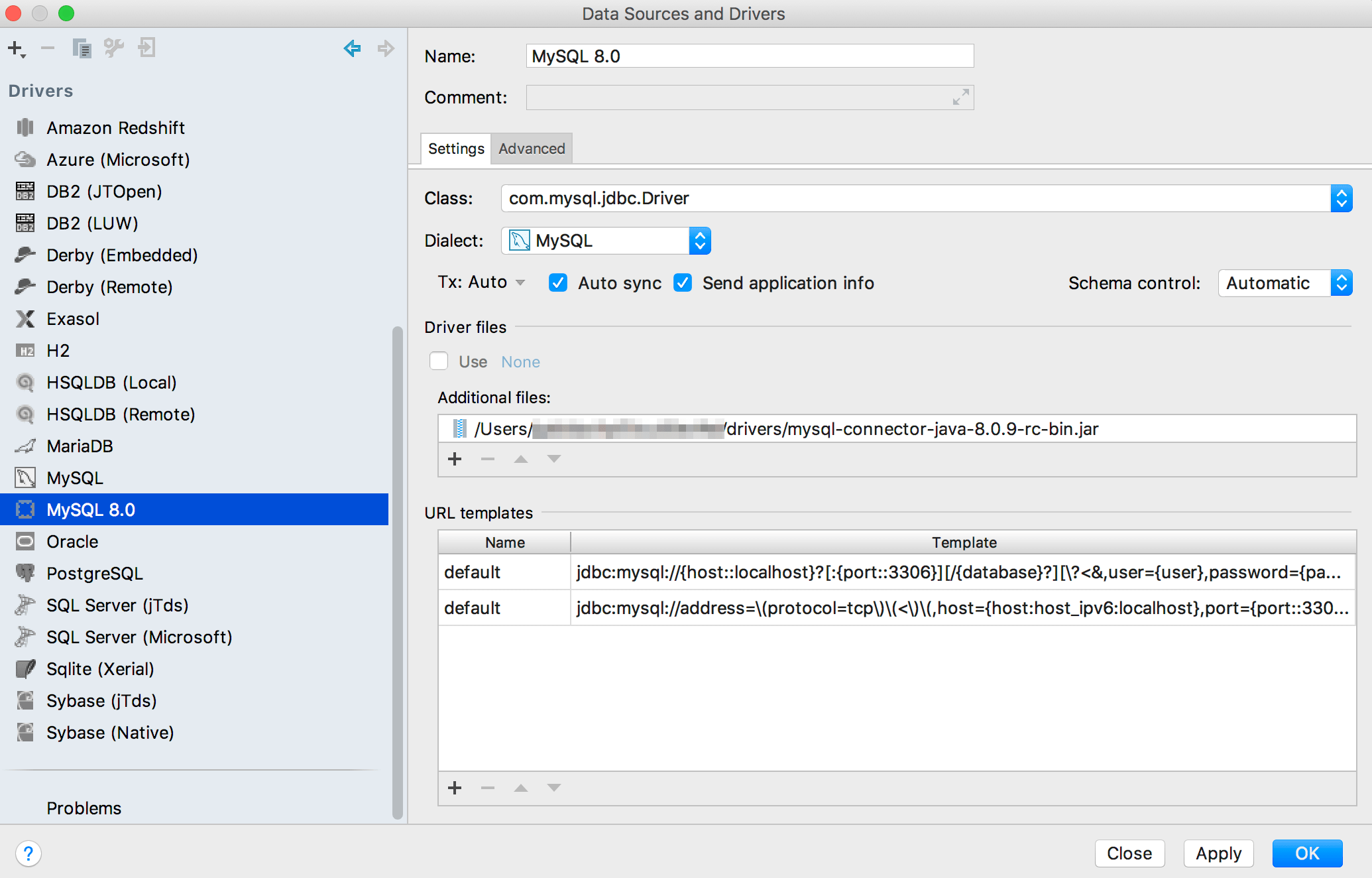
  1. Open Datagrip. Go to “File > Data Sources“. A window will open, right click on top of the “MySQL” name and select Duplicate.
  2. A new Driver is added with the name “MySQL [2]”, rename it to “MySQL 8.0”
    Data_Sources_and_Drivers.png
  3. Then, unselect “Use” on “Driver Files” and click on the + sign. Select the jar file you downloaded on the previous section.
    Data_Sources_and_Drivers.png
  4. Click in Apply.

3. Adding the source

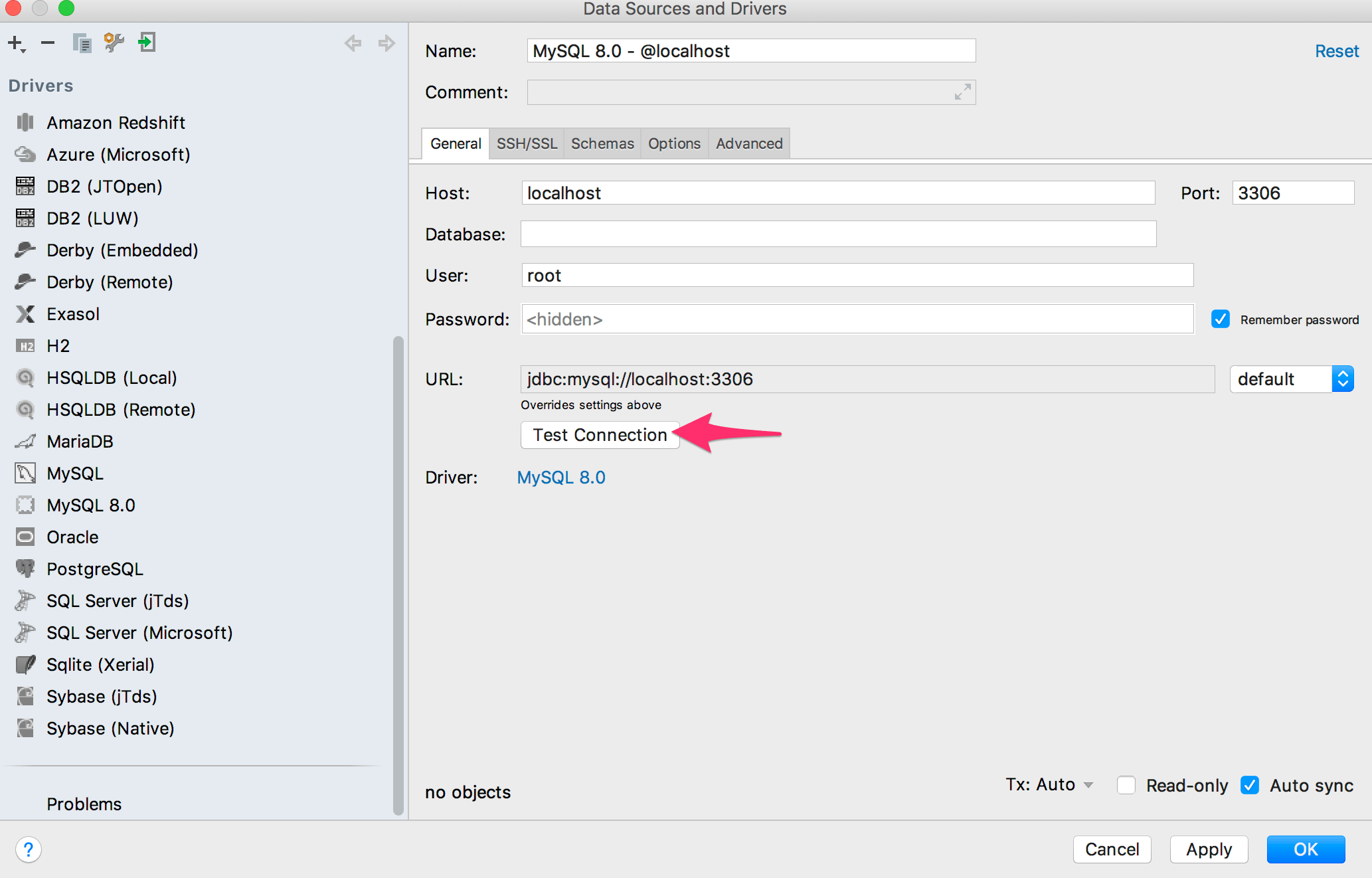
  1. On the same window, click on the + sign on the top left. Select “MySQL 8.0
    Screen Shot 2018-02-22 at 14.50.28.png
  2. Fill out the details as you would for a connection: Data_Sources_and_Drivers
  3. Click on “Test Connection“.
  4. If everything worked, just click in “OK” to exit the screen.